How to Login SPD88 Malaysia
Who this guide is for
This guide is for Malaysian users who already have, or believe they have, an SPD88, SPEED88 or SPD88C account and want to log in (log masuk) safely. It also suits anyone unsure whether a page they found is genuine before entering a username or password. See the registration guide first if you do not yet have an account.
Because SPD88, SPEED88 and SPD88C can appear across more than one domain or app, login safety is less about memorising a single fixed process and more about building a habit: always arriving at the login page the same trusted way, and always pausing if anything about the page looks unfamiliar. The sections below turn that habit into a concrete checklist.
This is not a real login pageSPD88MY.com is an independent guide. Nothing you read here collects a username, password or account detail — always log in on the platform's own current, verified page.
Before you start: login checklist
A short check before you log in prevents most access problems and almost all phishing attempts.
- You have the correct, current website address, ideally saved as a bookmark rather than clicked from a forwarded message.
- You are avoiding public Wi-Fi, or using a trusted connection if you must log in while out.
- You know your username, phone number or account ID, and your password is ready without being written somewhere visible.
- You have your phone nearby in case an OTP or verification step is required.
- You are prepared to stop and double-check if anything on the page looks different from usual.
Step-by-step login guide
- Visit the correct SPD88 / SPEED88 access page. Use a bookmark or type the address yourself rather than trusting a link shared in a chat group or comment section.
- Check the domain carefully. Look for subtle misspellings, extra characters or an unfamiliar ending — these are the most common signs of a copied phishing page.
- Click Login or Log Masuk. Both labels lead to the same access form across brand variants.
- Enter your username, phone number or account ID. Use exactly the detail you originally registered with.
- Enter your password. Avoid typing it into any field that is not clearly the password box, and never paste it into a chat with support.
- Complete verification if required. An OTP or security prompt may appear, especially from a new device or location.
- Check your balance and recent activity after login. This is the fastest way to notice anything unexpected.
- Log out when finished, especially on a shared or public device — staying logged in on a device you do not control is a common way accounts get compromised.
How to spot a fake login page
Pages built to imitate SPD88, SPEED88 or SPD88C are usually near-identical visually — the real risk is almost never in how a fake page looks, but in how you arrived at it. Treat any login page reached through a forwarded link, a pop-up advertisement or a social-media comment with extra suspicion, even when the design looks correct.
This matters more for casino-style accounts than for many other services, because a compromised account can be drained of its balance quickly, and because bonus terms can make disputing an unauthorised transaction more complicated than with a regular bank account. A few extra seconds spent checking a link before you tap it is a reasonable trade-off against that risk.
| Signal | Genuine page | Warning sign |
|---|---|---|
| How you arrived | Typed manually or opened from a saved bookmark | Clicked from a forwarded chat link or ad |
| Domain spelling | Matches the address you already trust exactly | Extra letters, numbers or an unfamiliar ending |
| Requested information | Username/ID and password only, OTP only when relevant | Full banking password, card PIN or unrelated personal data |
| Urgency | None — the form simply waits for you | Countdown timers or warnings pressuring immediate entry |
| After login | Takes you to your normal account dashboard | Redirects repeatedly or shows an unfamiliar layout |
If two or more of these warning signs are present, stop, close the page, and navigate to the platform independently instead of continuing through that link. See the safety guide for a broader checklist.
What the login screen usually shows
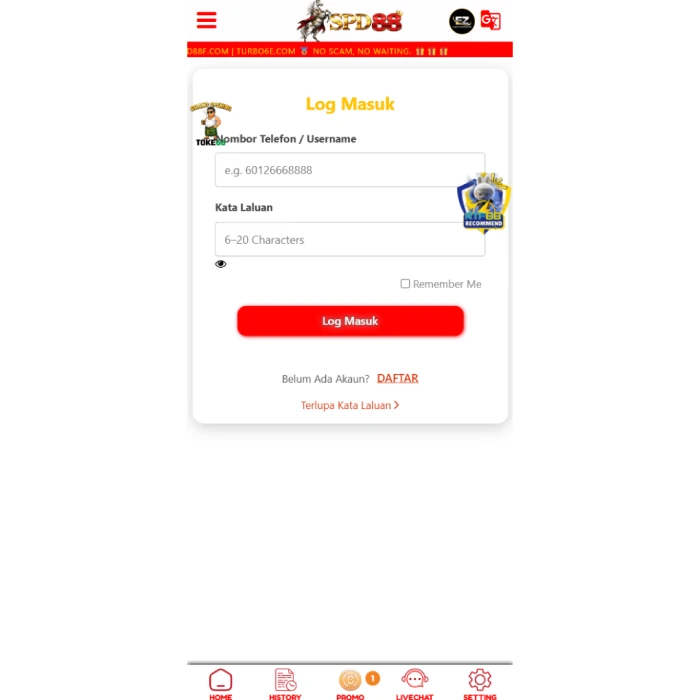
A typical SPD88-style login screen usually shows a Log Masuk or Login tab, often next to a Daftar or Register tab, a username/phone/ID field, a password field with a show/hide toggle, and sometimes a Remember Me option or a forgot-password link. It should not ask for your full card number, your online banking password, or an unrelated verification code at the login stage itself.
Mobile, desktop and shared devices
Logging in from a personal phone using a mobile browser is generally the lowest-friction and reasonably safe option, provided the domain is correct and you are not on an unfamiliar public network. If you use the app instead, see the app and APK guide for install-safety checks first. On a shared or public computer, avoid saving your password in the browser, use a private or incognito window where possible, and always log out fully rather than simply closing the tab.
Public or shared computers, such as those in a cybercafe, carry the highest risk because you cannot be certain no other software is monitoring what you type. If you must use one, avoid saving any password, clear the browser history and cache afterwards if possible, and change your password soon afterwards from a device you trust as an extra precaution.
| Access method | Convenience | Security consideration |
|---|---|---|
| Mobile browser | High — no install needed, works immediately | Depends only on you reaching the correct domain each time |
| Official app | High once installed, often faster to reopen | Only as safe as the source you installed it from |
| Desktop browser | Good for reading long terms comfortably | Same domain-checking rules apply as on mobile |
| Shared or public computer | Convenient in the moment | Highest risk — avoid saving anything and log out fully |
Session security and multiple devices
Most platforms keep you logged in for a period after you enter your password, which is convenient but also means anyone with access to your unlocked device can potentially use your session without needing your password again. Treat your phone or computer's own lock screen as part of your account security, not a separate concern.
If your account supports viewing active sessions or recent login activity, check it occasionally, particularly after using a new device or network. An unfamiliar session, device type or location in that history is one of the clearest signs worth investigating immediately, even if your password has not obviously been compromised.
Forgot password guide
If you forget your password, use the platform's own official reset process rather than asking someone else to reset it for you. A safe reset flow typically verifies your identity through your registered phone number or email and then lets you set a brand-new password directly — it should never require you to reveal your current or old password to another person, including anyone claiming to be support staff.
- Look for a Forgot Password or Lupa Kata Laluan link on the login screen.
- Confirm your identity using your registered phone number or email, whichever the platform requests.
- Enter the verification code sent to you, and do not share it with anyone else.
- Set a new, unique password that you have not used on this account or any other before.
- Log in again with your new password and confirm your account details are unchanged.
Lost access to your registered phone or email?
Account recovery becomes more difficult if you no longer have access to the phone number or email address you registered with, since that is usually how identity is verified for both login recovery and password resets. If this happens, contact verified support directly and be ready to prove ownership another way, such as details of your last deposit or recent account activity.
This is also a good reason to keep your registered contact details current. If you change your phone number, update it on the platform promptly rather than waiting until you need to recover access, since an outdated contact detail can turn a minor inconvenience into a lengthy support process.
Recognising legitimate account notifications
Genuine login-related notifications, such as an OTP message or a new-device alert, typically arrive only after you have taken an action yourself, such as attempting to log in. Be suspicious of any notification that arrives unprompted and asks you to click a link or reply with a code to prevent something happening to your account.
If you receive an unexpected security alert, the safer response is to open the platform independently — through your bookmark, not through any link in the notification — and check your account activity directly. A genuine issue will usually still be visible that way, without needing to trust the notification's link at all.
Safe login checklist
- Do not log in through links found in unsolicited messages or comments
- Avoid logging in over public or shared Wi-Fi where possible
- Never share your OTP or verification code with anyone
- Use a unique password you do not reuse elsewhere
- Log out fully from shared or borrowed devices
- Avoid unknown APK login shortcuts — see the app guide
- Bookmark the correct address instead of searching for it every time
Common login issues and fixes
| Issue | Possible cause | What to do |
|---|---|---|
| Wrong password | Typing error or forgotten password | Use the password-reset process described above |
| Account locked | Too many failed attempts, or a security hold | Wait, then contact verified support if it persists |
| Page not loading | Network issue or temporary server downtime | Try a stable connection, or attempt again shortly |
| App login failed | Outdated app version or a corrupted install | Update the app, or switch to the mobile browser |
| Suspicious redirect after login | Possible unsafe link or a compromised page | Stop, log out, change your password and verify the source |
| Balance looks wrong after login | Account or payment sync issue | Screenshot the balance and contact verified support immediately |
| Forgot username or account ID | Detail not written down after registration | Check your registration confirmation, or contact verified support |
| Session logs out unexpectedly | Timeout setting or an unstable connection | Log back in, and check your balance more often on unreliable networks |
A quick login safety scenario
Imagine you receive a message with a link claiming your SPD88 account needs urgent verification, with a countdown timer suggesting your balance will be frozen if you do not act within the hour. This combination — unsolicited contact, urgency and a request to log in through a supplied link — matches several of the phishing warning signs described earlier on this page.
The safer response is to ignore the link entirely, open your own saved bookmark or type the address yourself, and check your account directly. If there really is a genuine issue, it will typically also be visible when you log in normally, without needing to follow a time-pressured link from an unsolicited message.
Login mistakes to avoid
| Mistake | Why it matters |
|---|---|
| Typing your password into a page reached from a forwarded link | You cannot verify the page is genuine, even if it looks correct |
| Reusing your email or banking password for this account | A leak elsewhere becomes a direct risk to this account too |
| Ignoring a domain that looks slightly different from usual | Small spelling differences are a primary phishing technique |
| Staying logged in on a public or borrowed device | The next user of that device could access your session |
| Sharing your screen with an OTP visible during a support call | No genuine support process needs to see your OTP directly |
Bahasa Malaysia terms glossary
| Term | Meaning |
|---|---|
| Log masuk | Login / sign in |
| Kata laluan | Password |
| Lupa kata laluan | Forgot password |
| Akaun disekat | Account locked |
| Pengesahan | Verification |
| Log keluar | Log out |
What to check after you log in
Once inside your account, check your balance, your recent transaction history and any pending bonus wagering before you start playing. If anything looks unfamiliar — a balance you do not recognise, or activity you did not perform — stop and contact verified support rather than continuing to play. From here, the deposit guide and withdrawal guide cover the next steps most users take.
A quick post-login habit worth building is simply pausing for a moment before you start playing, the same way you might glance at a bank statement before spending. It takes seconds and makes it far more likely you will notice a genuine problem early, rather than well into a session.
Responsible gaming reminderLogging in safely protects your account, but it does not remove the financial risk of gambling itself. Set a budget before you play, and read responsible gaming if a session ever starts to feel out of control.
SPD88 platform screenshots
Frequently asked questions
Is this the official SPD88 login page?
No. This page is an independent informational guide about SPD88, SPEED88 and SPD88C login-related searches. It does not collect usernames, passwords or account details — always log in on the platform's own current, verified page.
Why can I not login to SPD88?
Common reasons include a mistyped or forgotten password, too many failed attempts triggering a temporary lock, a server or network issue, or an incorrect link. Working through the common login issues table on this page usually identifies the cause quickly.
What does log masuk mean?
Log masuk is the Bahasa Malaysia phrase for login or sign in. On SPD88, SPEED88 and SPD88C pages it is typically shown alongside or instead of the English word Login, and both lead to the same access form.
Can I reset my password?
Yes, most platforms offer an official password-reset process, usually verified through your registered phone number or email. Use that process directly rather than asking someone else to do it for you, and never reveal your current password during the process.
Should I login through Telegram links?
Be cautious. Links shared in Telegram groups, WhatsApp chats or social media comments can be forwarded many times and are harder to verify than an address you saved yourself. When possible, navigate to the platform independently instead of tapping a shared link.
Is this page a login form?
No. This is only an informational guide and does not collect account details. If any page ever asks you to enter a real username or password here, that is not intended behaviour for this website — leave immediately and report it.
What should I do if my account is locked?
An account can lock after several failed login attempts or as a security precaution. Wait a short period before trying again, use the password-reset option if you are unsure of your password, and contact verified support directly if the lock does not clear.
Is it safe to save my SPD88 password in my browser?
Saving a password on a personal, password-protected device can be reasonably convenient, but avoid it on shared or public computers. A dedicated password manager is generally safer than a browser's built-in autofill, especially on a device other people can access.
Why does my balance look different after I log in?
A balance can change because of processing bonuses, pending transactions or a brief sync delay. If a change looks unexplained rather than simply delayed, stop playing, take a screenshot and contact verified support before continuing.
Can I be logged in on two devices at once?
This depends on the platform's current session rules, which can vary and change. If you notice a login session you do not recognise, treat it as a security concern, log out of all sessions where possible, and change your password.